Define Alert Rule-Definitions
Schema Validation
You can validate your rules against our schema.
The YAML file for a complete set of rule definitions currently looks like this (without any rules). Please do not change any of the values:
# yaml-language-server: $schema='none'
---
schema: !!float 1.1
criterias:
    [YOUR CATEGORIES WILL BE CONFIGURED HERE]
Any Rule-Set will be created from predefined objects, that need to match our schema1.
Every value of the rules that can and should be translated in the platform needs to be defined with Key:Translation pairs. The key is the internally used value that will also be passed back to you if you request the FarmRules. The Translation-Object will be used to change the display name depending on the currently selected language.
Required Properties
You can provide as many languages as possible, but need to provide english, spanish and german translations.
Criteria
Any rule will be created around an entity - we call this entity criteria. It could be, for example, any internal "key" that you used for the rule evaluation or similar.
In the following example, we will create one simple criteria temperature and allow a rule configuration to match a certain value with different operators.
Each criteria definition needs to have an identifier, a displayName, and a description. The displayName and description are so-called Translation-Values. In our example, the identifier will be 'temperature'.
With the displayName, you can provide translations for the display name of your entity. The description may be used for explaining what this entity can be used for.
temperature:
    displayName:
        en: Temperature
        es: Temperatura
        de: Temperatur
    description:
        en: Temperature of the device
        es: Temperatura del dispositivo
        de: Temperatur des Geräts
Rule Parts
As part of each criteria, you can define any number of parts that the user can interact with to configure a certain rule. Each part (also called field) will result in a different visual outcome based on the field type.
Each part is created from a key-identifier, a title, and a field-type:
parts:
    keyidentifier:
        field: select
        title:
            en: English Translation
            es: traducción al español
            de: Deutsche Übersetzung
    [ANY OTHER FIELD]
IMPORTANT
Depending on the field-type, there are additional properties needed
Field Types
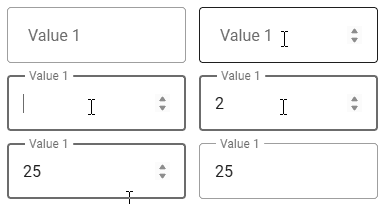
Input field to require the user to input a value. You can define the type of the input field (HTML Input Type).
select
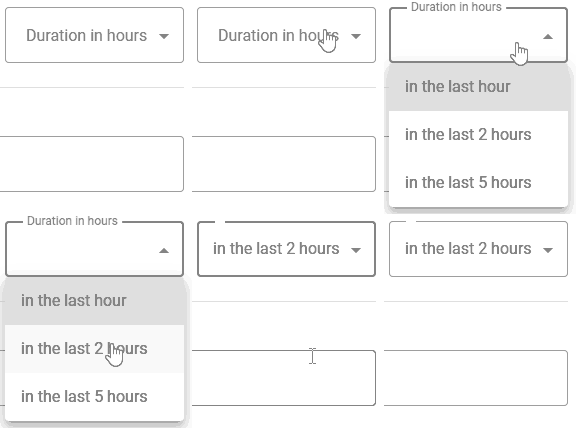
Dropdown field to select a predefined value from. The values to select from are an array of Key:Translation pairs.
operator:
    field: select
    title:
        en: Operator
        es: Operador
        de: Operator
    values:
        eq:
            en: Equals
            es: Igual
            de: Gleich
        gt:
            en: Greater than
            es: Mayor que
            de: Größer als
label
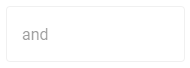
Read-only field to display an information that can't be edited.
Full Example
You can checkout a full, working example for this scenario: Example
Outcome / Configured Rules
Configured rules will result in a JSON-Object derived from the category-identifier and all part-identifiers:
{
    "criteria": "humidity",
    "label1": "between",
    "label2": "and",
    "value1": "50",
    "value2": "70",
    "duration": "2"
}
You can use the Module Api to receive all configured FarmAlertRules (including the rule + additional information)
Endpoint not yet available
The endpoint to receive all configured rules is currently in development and will be deployed in the next couple of weeks.
Outcome will look like this:
{
        "@odata.context": "https://app-hv-c-farmadmin-tes-weu-001.azurewebsites.net/api/v1.0/11152f81-46ca-477d-a541-f0a70e7aae9b/$metadata#FarmAlertRules",
        "value": [
            {
                "id": "21c1dac5-6ad3-43e9-8f0e-a272c426eaaf",
                "farmOrganizationId": "11152f81-46ca-477d-a541-f0a70e7aae9b",
                "moduleId": "c2036c8e-19fc-4728-be91-96aabbc79ebd",
                "farmId": "4d947e2b-bdf1-476d-b0cf-1587faa03133",
                "description": "VERY WET",
                "descriptionTranslationsAsJson": null,
                "raisesNotification": false,
                "recipients": [
                    "73fa5a92-1f69-41eb-b908-9729ebab7f04"
                ],
                "ruleAsJson": "{\"criteria\":\"humidity\",\"label1\":\"between\",\"label2\":\"and\",\"value1\":\"50\",\"value2\":\"70\",\"duration\":\"2\"}"
            }
        ]
    }