Implementation for Vendor Modules
Due to the module federation and Single Page Application (SPA) architecture, the vendor modules are loaded into the Bayer HortiView application within the same HTML document and thus must comply with the same CSP header. This means that any resources loaded by the vendor modules must also adhere to the restrictions defined in the CSP header of Bayer HortiView.
Impact on vendor modules
No unsafe-eval expressions
If you are using React Element Design components / one of the following packages, you should make sure to use the listed versions to avoid unsafe-eval expressions in your code base (caused by @element/react-table using older versions of @dnd-kit packages):
- @element/* from Bayer Artifactory: Version 5.73.0 or higher
- @element-public/* from npm: Version 5.72.2-alpha.1 or higher
- @hortiview/shared-components: Version 2.14.0 or higher
- @hortiview/default-components: Version 1.4.4 or higher
When creating new modules with our module generator, please use version 2.0.19766 or higher.
You should also make sure to not include any unsafe evaluations in your own code, such as eval(), new Function(), or similar constructs that can lead to the execution of arbitrary code.
No unsafe-inline scripts
Please make sure to avoid the use of unsafe-inline scripts in your modules.
We are currently working on a vendor-friendly solution to also remove the unsafe-inline keyword from the style-src directive. As we know that third-party libraries often require the use of inline styles, we want to ensure that our vendor partners can continue to use these libraries without issues while maintaining a strong security posture for Bayer HortiView.
To avoid unsafe inline scripts and styles in your own code, you can use the following approaches:
- In your
public/index.htmlfile, avoid including any inline scripts or styles and instead reference external files. - For scripts, avoid
dangerouslySetInnerHTMLin React and instead use event handlers and other React features to manage dynamic content. - For styles, consider using CSS classes and external stylesheets instead of inline styles. You can also use CSS-in-JS libraries that support CSP compliance, such as styled-components or Emotion.
Use Linting Tools
If you are using code linting tools, configure them to flag unsafe evaluations, inline scripts and styles to help ensure CSP compliance. Recommended tools and rules:
- Activate ESLint's built-in JS rules
no-evalandno-new-functo disalloweval()andnew Function()usage. - eslint-plugin-react —
react/no-dangerdisallowsdangerouslySetInnerHTML;react/forbid-dom-propscan forbid thestyleprop to prevent inline styles in JSX DOM nodes (not components). - Custom ESLint rules — implement rules to forbid
styleattributes in JSX or to banon*attributes (e.g.,onclick) when those originate from template HTML. - html-eslint — lint static HTML files; see rule
no-inline-styles - HTMLHint — basic HTML checks; configure rules such as
inline-script-disabledandinline-style-disabled.
If you are using Svelte, consider eslint-plugin-svelte rule no-inline-styles.
Restricting connect-src in the future
Currently, the CSP header allows all connections for the connect-src directive, which is necessary for the functionality of the vendor modules.
However, we are working on a vendor-friendly solution to restrict this further in the future and you don't need to take actions at the moment.
We will keep you updated on any changes to the CSP header that may affect your vendor module and provide guidance on how to ensure compliance with the new restrictions.
Is my module CSP compliant?
The CSP header will be activated on the Bayer HortiView platform during March 2026.
After activation, the CSP header will be returned as a response header of the HortiView platform's HTML document. Any violations of the CSP header will be reported in the browser's developer console, and any blocked resources will not be loaded, which may affect the functionality of your vendor module if it relies on resources that are not allowed by the CSP header.
We recommend testing your vendor module for CSP compliance before the activation of the CSP header to ensure a smooth transition and avoid any disruptions in functionality for the users of your module.
Before activation: Meta-Tag insertion via Browser DevTools
You can test the compliance of your vendor module with the CSP header by temporarily adding a meta tag to the HTML document of Bayer HortiView using the browser's developer tools. This allows you to simulate the presence of the CSP header and identify any potential issues before the actual activation of the CSP header on the platform.
Warning
Please make sure that you insert the CSP meta tag as one of the first meta tags in the <head>...</head> and BEFORE you open any modules for the first time, as the CSP won't be applied to previously loaded resources.
The most reliable way to ensure the CSP takes effect is to:
- go the dashboard
- reload the page
- add the meta tag to the HTML
- directly open the module without reloading the page again.
In this example, we are adding the meta tag as the first meta tag in the <head> section of the HTML document:
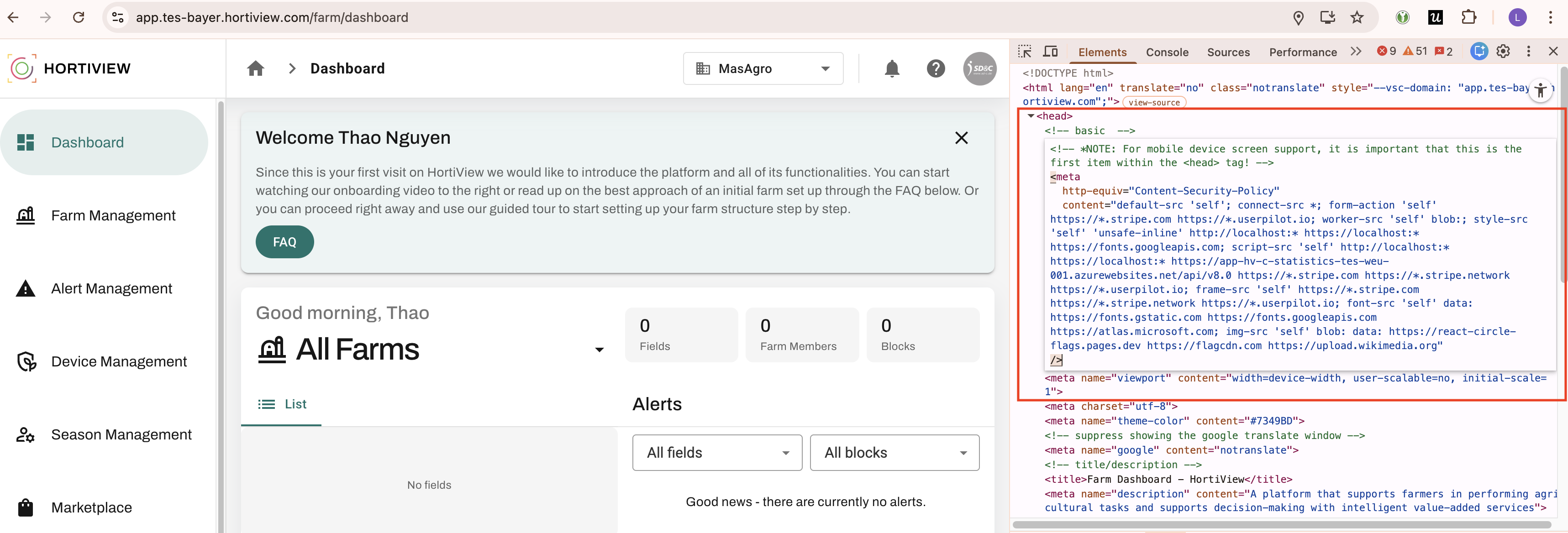
On Bayer Test, you can use this meta tag to simulate the Bayer HortiView CSP header:
<meta
  http-equiv="Content-Security-Policy"
  content="default-src 'self'; connect-src *; form-action 'self' https://*.stripe.com https://*.userpilot.io; worker-src 'self' blob:; style-src 'self' 'unsafe-inline' http://localhost:* https://localhost:* https://fonts.googleapis.com; script-src 'self' http://localhost:* https://localhost:* https://app-hv-c-statistics-tes-weu-001.azurewebsites.net/api/v8.0 https://*.stripe.com https://*.stripe.network https://*.userpilot.io; frame-src 'self' https://*.stripe.com https://*.stripe.network https://*.userpilot.io; font-src 'self' data: https://fonts.gstatic.com https://fonts.googleapis.com https://atlas.microsoft.com; img-src 'self' blob: data: https://react-circle-flags.pages.dev https://flagcdn.com https://upload.wikimedia.org"
/>
Finding CSP Violations
To check if your vendor module is compliant with the CSP header of Bayer HortiView, you can use the browser's developer tools to inspect the network requests and console for any CSP violations.
For a deployed module, a CSP violation message in the console can look like this:
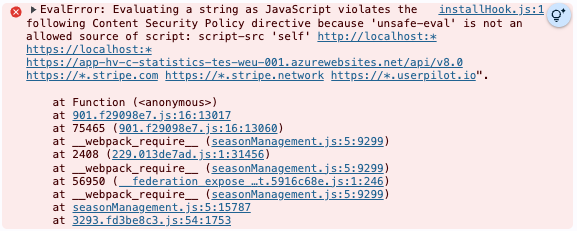
Unfortunately, the source map is not available for the production build of the module, so the violation message will not include the exact file and line number where the violation occurred.
To identify the source of the violation, you can use the LocalDebug module from the marketplace to test your module in a local development environment where source maps are available.
In Chrome DevTools, we must click on Show ignore-listed frames to see the source of the violation in the stack trace:
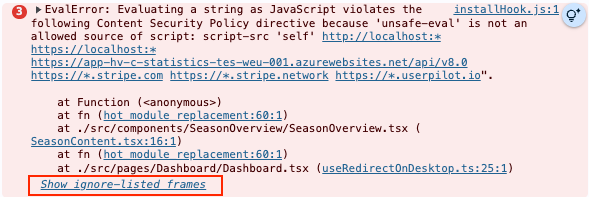
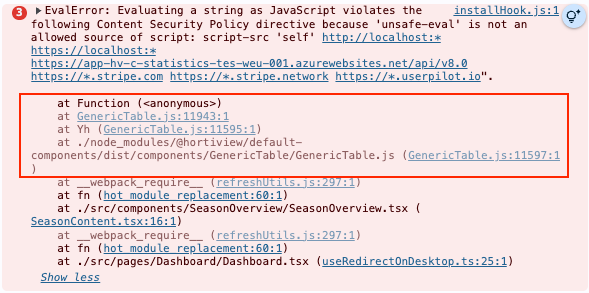
In this example, the violation is caused by the GenericTable component from @hortiview/default-components.
GenericTable uses @element/react-table, which causes a known issue with unsafe-eval expressions in older versions - by updating @hortiview/default-components to version 1.4.4 or higher, the issue can be resolved and the violation will no longer occur.
Fixing CSP Violations
If you encounter any CSP violations, you will need to modify your vendor module to ensure that it complies with the restrictions defined in the CSP header of Bayer HortiView. This may involve:
– Updating, removing or replacing any resources that are not allowed by the CSP header, e.g.
- using a different library or updating to a version that does not require
unsafe-eval - replacing an external image source by an image from your module's assets (to be hosted by the main platform URL instead of the forbidden external URL)
– Refactoring your code to avoid the use of inline scripts.
With the LocalDebug module from the marketplace, you can test if your changes are compliant before re-publishing. If the CSP header has not been activated by the HortiView platform yet, please make sure that a CSP meta tag is set, following the correct process, before re-testing with the LocalDebug module.