Consuming Data Shared By Other Modules
Warning
HortiView currently allows only base and core modules to share data with third-party modules. For example, the platform's "Season Management" module shares data with third-party vendors, but the consuming module cannot share its data with other third-party modules.
Modules vendors can leverage data provided by other modules for their own use cases. This section will illustrate how it works in principle and shine light on the architecture. If you're interested in its practical application see section "Example: Consuming Season Data".
Note
In the following paragraphs we will refer to the module sharing data as the provider, and to the module accessing the data as the consumer.
Example: Consuming Season Data
Consuming data in HortiView is simple and consists of two simple steps:
- Configure your module dependencies in the module information page.
- Use our APIs or our module template to fetch the data
Step 1: Configuring Module Dependencies
- Navigate to your module (e.g.
https://devbox.hortiview.com/vendor/my-modules/70525e71-4b1a-4a2a-abdf-e35ffe47adc8) - Scroll to section "Usage of Third Party Modules"
-
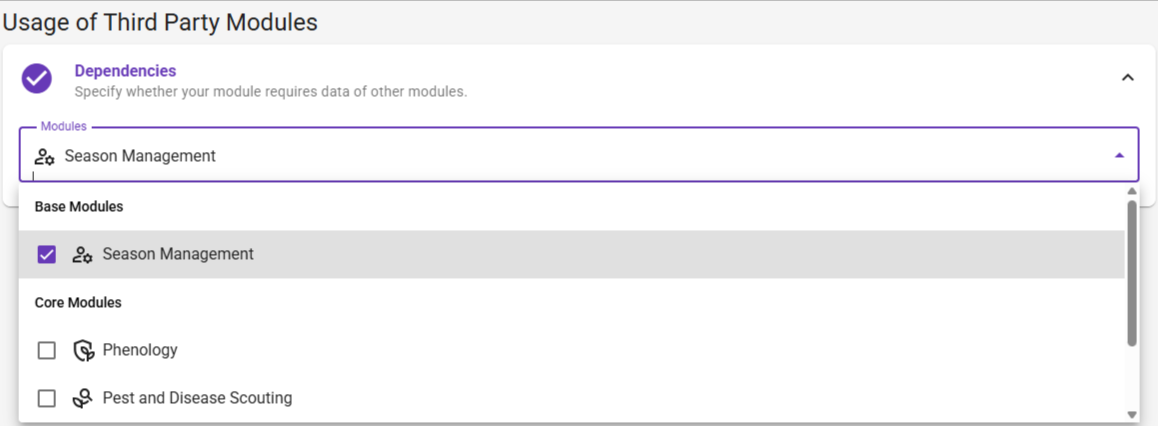
Select the dependencies you need for your module:
-
Save changes.
Step 2: Consume Module Data
Consuming module data is easy once you understood the concept. In this example, we want to retrieve season data.
- We need to look up the entities our module has defined:
orgIdrepresents the organization you want data from; in most cases it's the current organizationmoduleIdrepresents the ID of the module requesting the data; in most cases it's your module ID
This request will return an array of entities you can fetch from the module:
[
    {
        "moduleId": "98097e68-efae-4f89-9353-2e1bbb6acb46",
        "registeredEntityName": "BlockPlantLayout",
        "id": "1ffc30b8-4c9d-4eac-aff2-0d12b10bb853"
    },
    {
        "moduleId": "98097e68-efae-4f89-9353-2e1bbb6acb46",
        "registeredEntityName": "Season",
        "id": "89558db1-0225-4891-ba3f-974e4af1b57d"
    }
]
- Next, we invoke the
/api/v1.0/{orgId}/ModuleDependentEntities/{moduleId}/{entityId}endpoint and pass the entity ID of the "Season" entity:
This request will return an array of Season entities:
[
    {
        "entityName": "blockplantlayout",
        "season": null,
        "blockPlantLayout": {
        "blockId": "52830c5e-e922-402a-bf52-3ecaf5e0d7b8",
        "arrangementType": null,
        "offsetPlants": 50,
        "offsetPlantsUnit": "cm",
        "rowLength": 30,
        "rowLengthUnit": "meter",
        "offsetRows": 30,
        "offsetRowsUnit": "cm",
        "numberOfRows": 10,
        "numberOfPlants": 2,
        "id": "c34ef099-018d-450b-8993-689f1ab98dfc"
        },
        "recordLight": null,
        "id": "c34ef099-018d-450b-8993-689f1ab98dfc"
    },
    {
        "entityName": "blockplantlayout",
        "season": null,
        "blockPlantLayout": {
        "blockId": "f8dae3c2-bab8-452a-83de-6d623e3cb16d",
        "arrangementType": null,
        "offsetPlants": 30,
        "offsetPlantsUnit": "cm",
        "rowLength": 100,
        "rowLengthUnit": "meter",
        "offsetRows": 70,
        "offsetRowsUnit": "cm",
        "numberOfRows": 4,
        "numberOfPlants": 2,
        "id": "46492520-fa8a-4567-a771-a00d1a813969"
        },
        "recordLight": null,
        "id": "46492520-fa8a-4567-a771-a00d1a813969"
    }
]
That's it. You just fetched data from the Season Module using our Module API directly.
The following explanations require you to use our module template. It encapsulates fundamental operations like accessing module data.
- Follow the guide to fire up the template.
- Next create a component that is supposed to render seasons. For example:
import { Group } from "@element-public/react-group";
import { TypoBody } from "@element-public/react-typography";
import { useEntity } from "@hortiview/modulebase";

export const SeasonComponent = () => {
    const { data: seasons } = useEntity("ModuleDepended", "Season");

    return (
        <Group>
            {seasons.map((season) => (
                <TypoBody>{season.cropSeasonName}</TypoBody>
            ))}
        </Group>
    );
};
If you want to retrieve blocks used in seasons, you can do something like this:
import { Group } from "@element-public/react-group";
import { TypoBody, TypoOverline, TypoSubtitle} from "@element-public/react-typography";
import { useEntity } from "@hortiview/modulebase";
import { Block, BlockPlantLayout } from "@hortiview/modulebase/dist/types/ModuleApi";
import { useMemo } from "react";

type MappedBlock = Block & {
    blockPlantLayout?: BlockPlantLayout | undefined;
};

export const SeasonComponent = () => {
    const { data: blockPlantLayouts } = useEntity("ModuleDepended","BlockPlantLayout");
    const { data: blocks } = useEntity("FarmOrganization", "zones");

    const mappedBlocks = useMemo(() => {
        return blocks.map((block) => {
            const mappedBlock: MappedBlock = block;
            mappedBlock.blockPlantLayout = blockPlantLayouts.find(
                (blockPlantLayout) => blockPlantLayout.blockId === block.id
            );
            return mappedBlock;
        });
    }, [blocks, blockPlantLayouts]);

    return (
        <Group>
            {mappedBlocks.map((block) => (
                <>
                <TypoOverline key={block.id}>{block.id}</TypoOverline>
                <TypoBody>Name: {block.blockName}</TypoBody>
                <TypoSubtitle>with {block.blockPlantLayout?.numberOfPlants} rows</TypoSubtitle>
                </>
            ))}
        </Group>
    );
};
You will find an overview of entities shared by other modules in the "Reference" section.