General Concepts: Data Sharing in HortiView
It is important to distinguish between platform data and module data:
-
Platform data is, as the name suggests, provided by the platform. It can be considered as master data. Platform data covers the minimum amount of data for modules to add value to the platform. This includes organization information, farm definitions, user information, etc.
-
Module data, however, will provide complementary data for farmers and other module developers. Modules add value for users by leveraging platform data, thus relieving them from maintaining their own farm definitions, users, etc.
Platform Data vs. Module Data
When developing modules for HortiView you will interact with the Module API most of the times. The Module API is responsible for routing data flows securely from modules to the platform and from one module to other modules.
Quick start with our Module Template
We strongly recommend to use our template for module development in HortiView. After scaffolding it is instantly useable and supports all operations described below out of the box.
Working with Platform Data
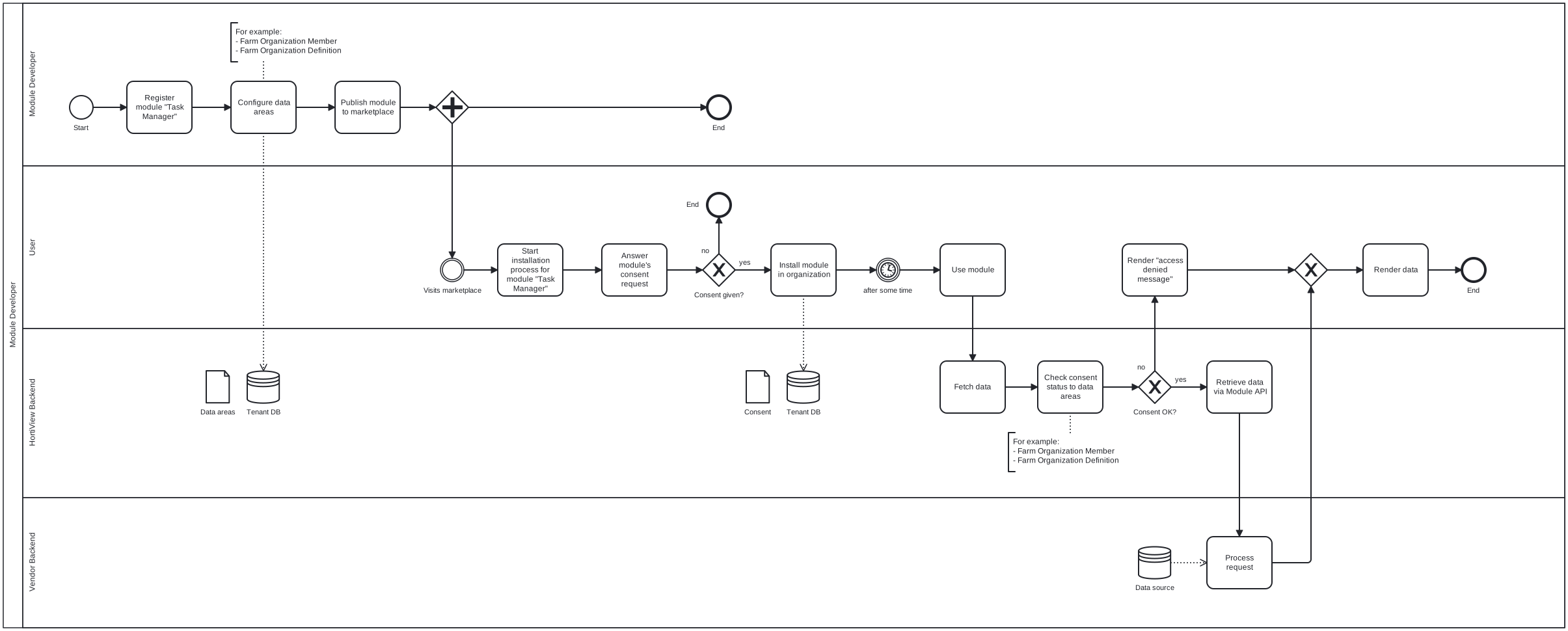
Platform data is off-limits for modules unless users have consented to giving access to data. We achieve this by compartmentalizing data in HortiView into "data areas".
For example, if a module wants to iterate over the list of members in an organization, it must tell HortiView that it wants access to data area "Farm Organization Member".
When installing the module, the user will be informed about the module's intent to access that data area. The consent information is stored in the platform and checked whenever a modules requests data from a particular data area.
Please refer to "Data Areas and Entities" for a list of data areas and associated entities.
The following diagram illustrates the how data areas and user consent records are used in practice:
Example: Retrieving Farm Entities of an Organization
In this scenario, your modules needs fields and irrigation stations to perform a certain task. Let's see how that would work.
React developers should use our module template
If you are a React developer, please take a look at our module template. It encapsulates all necessary functionality relieving you from working with APIs directly.
-
In your module configuration, make sure to have the data area "Farm Organization Definition" selected. This will instruct the platform to encode this data area into the module permission token.
-
Visit our Swagger page for the
CommonDataAPI (Link) and authenticate.- Use the
/api/v1.0/dataareagroup/dropdownendpoint to fetch the list of available data areas and their IDs. Along with other data areas the call will return some thing like this for the data area "Farm Organization Definition":
* Use the{ "id": "9e8f1cdd-440d-440a-8a14-25f3f5385c2e", "value": "Farm Organization Definition", "description": "domain", "key": "FarmOrganization", "parent": null, "icon": "domain" }/api/v1.0/dataareaentity/dropdownto retrieve a list of entities and their data area IDs they are associated with. The result will return something like this:We are interested in the entity IDs for fields and irrigation stations.{ "id": "2efe27ab-28f3-4df2-b584-db62b0c86f9c", "value": "fields", "description": "9e8f1cdd-440d-440a-8a14-25f3f5385c2e", "key": "Fields", "parent": "9e8f1cdd-440d-440a-8a14-25f3f5385c2e", "icon": "" }, { "id": "08ca7f97-53c6-4fff-a9f5-e684ffe171a9", "value": "irrigation_stations", "description": "9e8f1cdd-440d-440a-8a14-25f3f5385c2e", "key": "IrrigationStations", "parent": "9e8f1cdd-440d-440a-8a14-25f3f5385c2e", "icon": "" } - Use the
-
Equipped with this info, we can fetch fields and irrigation stations via the module API endpoint
/api/v1.0/{orgId}/FarmOrgEntities/{moduleId}/{dataAreaEntityId}:orgIdrepresents the organization you want data from; in most cases it's the current organizationmoduleIdrepresents the ID of the module requesting the data; in most cases it's your module IDdataAreaEntityIdrepresent the ID of the entity you want to access; the user must have given consent ot the data area "Farm Organization Definition" for this call to be successful.
Retrieve fields:
Retrieve irrigation stations:
Working with Module Data
In HortiView, everything is a module, except for platform data (a.k.a "master data") such as farm definitions, users, business and personal information. For example, farmers manage seasons with the Season Management module. While the semantics of working with module data is similar to master data, there are some notable differences.
- There are no data areas for modules; this makes sense because every module would introduce its own data area that must be managed by HortiView.
- The consumer module defines a dependency to another module to gain access to the entities it shares; as a result a different set of endpoints in the Module API are used.
For a detailed discussion on how to consume data provided by other modules, please refer to our guide.