Data Access Controls in HortiView
In HortiView wie value user privacy and compliance with regulations. To achieve both, we introduced the concept of "Data Area Groups". These represent collections of different kinds of data that is created within the platform.
Currently, we support the following data area groups:
- Farm Organization Member - Contains entities about memberships and roles on the organization and farm location level.
- Farm Organization Definition - Includes entities concerning the farm definition, such as fields, blocks, irrigation stations, etc.
- Personal Information - Gives access to basic user profile information, including address and country the user has specified in the profile.
This has the following advantages:
- Instead of providing broad access to farm and personal data, module vendors have to decide during development whether they need access to a specific data area group in order to add value to their products. The selection of data area groups can be discussed with vendors during the module review process conducted by the platform owner.
- It is made transparent to users during the module checkout process what data area groups a module makes use of.
- Users have to consent to the data made available to modules; the consent records can be later inspected in the "Subscriptions" section of the organization profile.
Data Area Groups and User Permissions
Data area groups are set at the module level and outline the general access a module has to data from the Hortiview platform. These groups do not alter or override the permissions assigned to user roles within HortiView. When a farmer subscribes to a module and grants access to the FarmOrganization, that module gains general permission to use services associated with the Farm Organization.
For instance, it can read alert rules at the farm level. Based on role definitions, farm managers are allowed to view and modify these alert rules through the module, whereas workers are restricted to viewing them only. The Hortiview platform safeguards against accidental changes by farm workers, as they are not authorized to edit or add new rules.
The following diagram illustrates the how data areas and user consent records are used in practice:
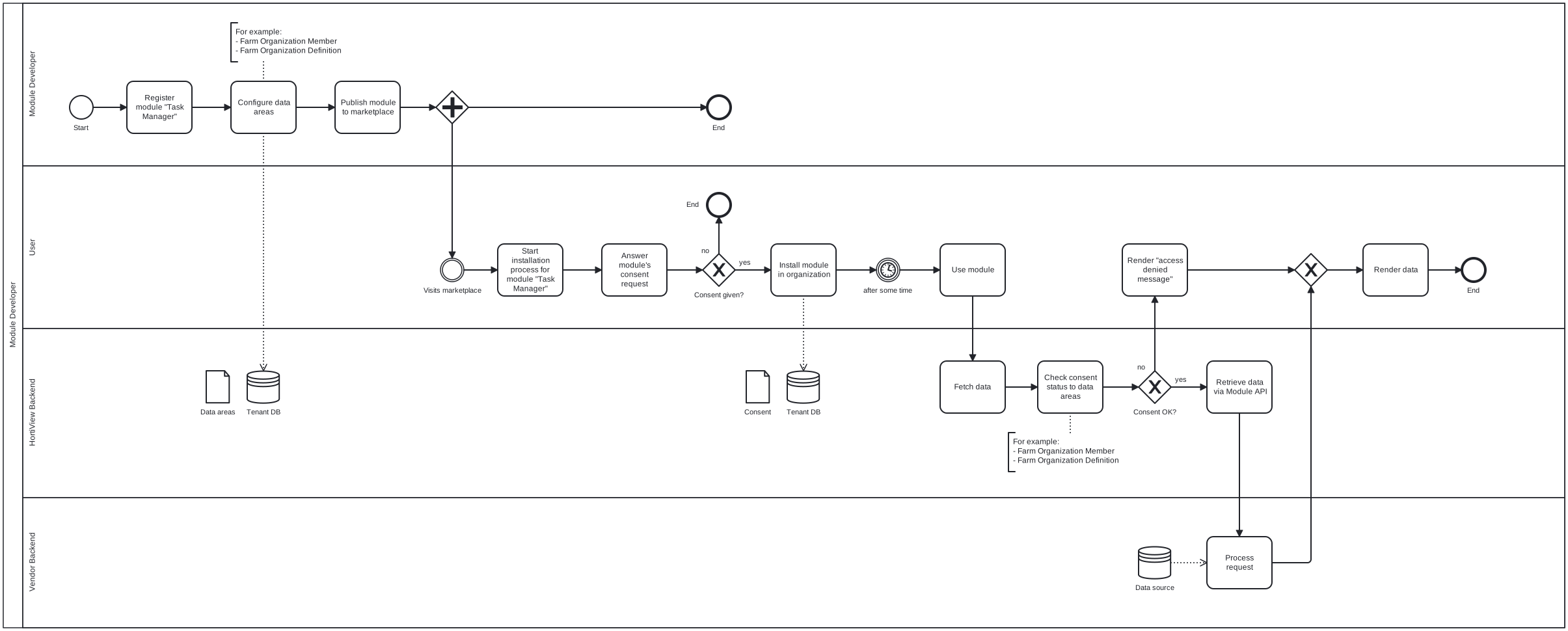
Access to data within a data area group is routed through a series of checkpoints to ensure that the organization has consented to access to a given data area group, and that the user is authorized to access it base on the permissions associated with the user's role.
Platform Data vs. Module Data
Platform data is, as the name suggests, provided by the platform. It can be considered master data. Platform data covers the minimum amount of data needed for modules to add value to the platform. This includes organization information, farm definitions and user information. Platform data is accessible to modules by requesting access to it via data area groups.
Module data is different. We have to distinguish between base modules that are part of the core set of functionalities and third-party modules developed by vendors and offered on the marketplace. Base modules share their data with other modules by using a different mechanism illustrated in section "Consuming Data Shared By Other Modules".
When developing modules for HortiView you will interact with the Module API most of the times. The Module API is responsible for routing data flows securely from modules to the platform and from one module to other modules.
Quick start with our Module Template
We strongly recommend to use our template for module development in HortiView. After scaffolding it is instantly useable and supports all operations described below out of the box.
Working with Platform Data
Platform data is off-limits for modules unless users have consented to giving access to data. We achieve this by compartmentalizing data in HortiView into "data areas".
For example, if a module wants to iterate over the list of members in an organization, it must tell HortiView that it wants access to data area "Farm Organization Member".
When installing the module, the user will be informed about the module's intent to access that data area. The consent information is stored in the platform and checked whenever a modules requests data from a particular data area.
Please refer to "Data Areas and Entities" for a complete list of data areas and associated entities.
Working with Module Data
In HortiView, everything is a module, except for platform data (a.k.a "master data") such as farm definitions, users, and personal information. For example, farmers manage seasons with the Season Management module. While the semantics of working with module data is similar to master data, there are some notable differences.
- There are no data areas for modules; this makes sense because every module would introduce its own data area that must be managed by HortiView.
- The consumer module defines a dependency to another module to gain access to the entities it shares; as a result a different set of endpoints in the Module API are used.
For a detailed discussion on how to consume data provided by other modules, please refer to our guide.