Work in progress
This part only describes the general use of module federation.
For the template, please visit instructions for a React module.
Module Federation
Module Federation combines the concept of micro frontends and enhances the idea behind modules. With modules, we can develop smaller packages or solutions that can consume each other to function as a full program. Those modules get built and bundled in a somewhat precompiled solution, but with Module Federation, we allow modules to be consumed at runtime instead.
Concept of Micro Frontends in Module Federation
Module Federation, introduced in Webpack 5, enables applications to dynamically share code across different projects (or "micro-frontends") without bundling dependencies redundantly. It achieves this by allowing an app (referred to as the host) to consume code from another app (the remote), while both can share or avoid duplicating certain modules (e.g., React, utilities, or components).
More information about the concept behind Module Federation can be read in the documentation of Webpack[^0].
Each application (either host or remote) defines modules it wants to share (or "expose") by configuring the ModuleFederationPlugin in its Webpack configuration. These exposed modules are then dynamically accessible by other applications.
For HortiView, you want to expose your full solution as a component, making it accessible for the HortiView application. By providing the configuration parameters of the module federation, we understand what needs to be imported and what dependencies are shared.
For more information about creating a module, you can follow the instructions for a React module.
Module Integration
Any module that will be integrated via module federation by HortiView will receive a number of properties and methods. These can be used to ensure the best possible integration of the module.
In constant development
This object will be expanded periodically. We will likely provide a types node module in the future.
We currently pass the following object to any module:
export type BaseProps = {
  /**
   * Indicates whether the host application is online.
   */
  isOnline?: boolean;
  /**
   * ModulePermissionToken for the module, used to communicate with the module API.
   */
  modulePermissionToken?: string;
  /**
   * id of the module
   */
  moduleId?: string;
  /**
   * id of the organization, where the module is used
   */
  organizationId?: string;
  /**
   * base path of the module (that is part of the URL and will be used for routing)
   * e.g. /farm/modules/{moduleId}
   */
  basePath: string;
  /**
   * current path of the route, that is changed, when the host application navigates
   * e.g. /farm/modules/{moduleId}/details/42
   */
  currentNavigationPath?: string;
  /**
   * current language of the host application, en-US, de-DE, etc.
   */
  currentLanguage?: string;
  /**
   * current language id of the host application
   */
  currentLanguageId?: string;
  /**
   * common options that are used in the module, to show dropdowns with options
   */
  commonOptions?: AllDropdownsData<CommonOption>['items'];
  /**
   * environment variables that are used in the module, to show environment specific information
   */
  environmentVariables?: EnvironmentVariable[];
  /**
   * function to refresh the module permission token, that is used to communicate with the module api
   * @returns a new module permission token, or undefined if the token could not be refreshed
   */
  refreshModulePermissionToken?: () => Promise<string | undefined>;
  /**
   * Host navigation callback for non-React remotes.
   *
   * React modules should use React Router's `useNavigate` directly and prefer relative paths.
   * Angular (or other non-React) modules should call this callback to ask the host shell to navigate.
   *
   * @example
   * React module (recommended):
   * ```tsx
   * import { useNavigate } from 'react-router';
   *
   * const navigate = useNavigate();
   *
   * navigate('details/42'); // /farm/modules/{moduleId}/details/42
   * navigate(''); // /farm/modules/{moduleId}
   *
   * // Avoid absolute paths in module-internal navigation:
   * // navigate('/details/42')
   * ```
   *
   * @example
   * Angular module:
   * ```ts
   * // baseProps is provided by the host application
   * baseProps.navigateInHortiview?.('details/42');
   * baseProps.navigateInHortiview?.('');
   * ```
   *
   * The host can normalize and prepend `basePath` as needed.
   * @param path
   * @returns
   */
  navigateInHortiview?: (path: string) => void;
  /**
   * the entry file url for the module, that is used to load the module in the host application
   */
  sourcePath?: string;

  //#region Translations for breadcrumb
  /**
   * function to add a translation to the i18n instance of the host application, that is used for breadcrumb translations
   * @param translation
   * @param hide
   * @returns
   */
  addBreadcrumbTranslation?: (
    translation: {
      key: string;
      value: string;
    },
    hide?: boolean
  ) => void; //use key = id and value = name

  //#endregion

  //#region Messaging
  /**
   * function to show a snackbar in the host application, that is used to show messages in the host application
   * @param message
   * @param icon
   * @returns
   */
  showSnackbar?: (message: string, icon?: string) => void;

  //#endregion

  //#region Offline Actions
  /**
   * list of pending actions that are used in the module, to show pending actions in the host application
   */
  pendingActions?: ActionItem[];
  /**
   * function to get the list of pending actions, that are used in the module, to show pending actions in the host application
   * @returns
   */
  getPendingActions?: () => ActionItem[];
  /**
   * function to resolve a pending action, that is used in the module, to show pending actions in the host application
   * @param key
   * @param result
   * @returns
   */
  resolveAction?: (key: string, result?: string) => void;
  /**
   * function to start resolving a pending action, that is used in the module, to show pending actions in the host application
   * @param key
   * @returns
   */
  startResolvingAction?: (key: string) => void;
  /**
   * function to add a pending action, that is used in the module, to show pending actions in the host application
   * @param functionName
   * @param args
   * @param key
   * @returns
   */
  addAction?: (functionName: string, args: unknown[], key?: string) => void;
  /**
   * function to get the list of actions, that is used in the module, to show actions in the host application
   * @returns
   */
  getActions?: () => ActionItem[];
  /**
   * function to get an action by key, that is used in the module, to show actions in the host application
   * @param key
   * @returns
   */
  getActionByKey?: (key: string) => ActionItem | undefined;
  //#endregion

  //#region error handling and telemetry
  /**
   * function to log an event to the host application, that is used for telemetry
   * @param event
   * @param customProperties
   * @returns
   */
  logEvent?: (event: AppInsightsEvent, customProperties?: AppInsightsProperties) => void;
  /**
   * function to log an error to the host application, that is used for telemetry
   * @param exception
   * @returns
   */
  logError?: (exception: AppInsightsException) => void;
  /**
   * function to throw an error in the host application, that is used for error handling
   * @param message
   * @param code
   * @returns
   */
  throwError?: (message: string, code: number) => void;
  //#endregion

  /**
   * @deprecated Use `modulePermissionToken` instead. This property will be removed in a future version.
   */
  token?: string;
  /**
   * @deprecated Use endpoint in module api (/api/v8.0/Messages/SendMessage/{moduleId}) instead. This property will be removed in a future version.
   * @param message
   * @returns
   */
  showMessage?: (message: SystemMessage) => void;
};
Properties
isOnline
Indicates whether the host application is online.
The following example shows how to use isOnline:
  import { useBaseProps } from "@hortiview/modulebase";
  ...
  export const Testpage = () => {
    const { isOnline } = useBaseProps();
    ...
    if(isOnline) return <OfflineDisclaimer />
    return <OnlineContent />
  }
modulePermissionToken
A module permission token for the module, used to communicate with the module API. This token can also be used to validate requests to your own backend. Please take a look at Backend Integration for more details.
moduleId
ID of the module.
organizationId
ID of the organization where the module is used.
basePath
Base path of the module (part of the URL and used for routing).
Example: /farm/modules/{moduleId}.
currentNavigationPath
Current route path, which changes when the host application navigates.
Example: /farm/modules/{moduleId}/details/42.
currentLanguage
Current language of the host application, for example en-US or de-DE.
currentLanguageId
Current language ID of the host application.
sourcePath
Entry file URL for the module, used to load the module in the host application.
commonOptions
Common options used in the module, for example to populate dropdowns.
{
  "AlertCriteriaName": [
    {
      "id": "cd623c33-a96d-4a33-be43-df981a909d2a",
      "value": "Disease",
      "description": "",
      "key": "",
      "parent": null,
      "icon": null
    },
    ...
  ],
  "Category": [...],
  "Country": [...],
  ...
}
environmentVariables
Environment variables used in the module, for example to display environment-specific information.
pendingActions
List of pending actions used in the module, for example to display pending actions in the host application.
token
deprecated
Use modulePermissionToken instead. This property will be removed in a future version.
The legacy module permission token.
Methods
refreshModulePermissionToken
Refreshes the module permission token used to communicate with the module API.
Returns a new module permission token, or undefined if the token could not be refreshed.
navigateInHortiview
Host navigation callback for non-React remotes.
React modules should use React Router's useNavigate directly and prefer relative paths. Angular (or other non-React) modules should call this callback to ask the host shell to navigate.
The host can normalize and prepend basePath as needed.
addBreadcrumbTranslation
Adds a translation to the i18n instance of the host application. It is used for breadcrumb translations.
Use key = id and value = name.
Take a look at the implementation of proper internationalization in HortiView.
showSnackbar
Shows a snackbar in the host application.
getPendingActions
Returns the list of pending actions used in the module.
resolveAction
Resolves a pending action.
startResolvingAction
Marks a pending action as currently being resolved.
addAction
Adds a pending action.
getActions
Returns the list of actions.
getActionByKey
Returns an action by key.
logEvent
Logs an event to the host application for telemetry.
logError
Logs an error to the host application for telemetry.
throwError
Throws an error in the host application for error handling.
See Error Handling.
showMessage
deprecated - This property will be removed in a future version.
Use endpoint in module API (/api/v8.0/Messages/SendMessage/{moduleId}) instead.
Creates a message in HortiView that can be seen in the notification bar.
Offline-Capability related methods | ActionQueue
alpha version - do not use in production
Please use the ./Functions exposed component with onBackOnline and onPlatformLoaded functions
Offline related
The following methods are related to the Offline Capabilities If you don't plan to integrate heavy offline capability, you probably won't need them.
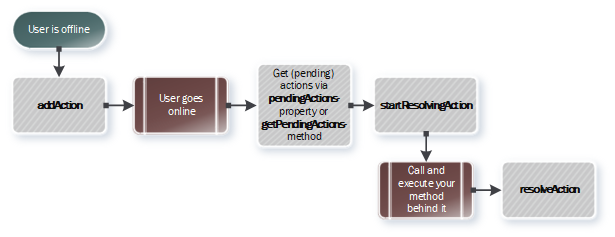
addAction
Allows to add an internal action/method to the ActionQueue.
import { useBaseProps } from "@hortiview/modulebase";
...
export const ASamplePage = () => {
  const { addAction } = useBaseProps();
  ...
  addAction?.("addExternalData", [
    {
      Title: newKey,
      PlantToTrack: newValue,
      ID: 0,
    },
  ]);
}
As you can see in the example, the logic is intentionally kept simple because it is nearly impossible to pass a complete function to browser-based storage without losing its context. However, maintaining the correct context is crucial—the functions need to be executed within YOUR module and not the platform, due to permissions and code structure. Therefore, we have chosen this approach.
startResolvingAction
Calling this method with the ActionKey of a module will update its state to resolving. This indicates that the action is currently being processed.
import { useBaseProps } from "@hortiview/modulebase";
const { pendingActions, startResolvingAction } = useBaseProps();
...
for (const action of pendingActions) {
  startResolvingAction?.(action.key);
}
resolveAction
Invoking this method will set the state of the specified action to resolved, marking it as successfully completed.
getActionByKey
Retrieves the action associated with the provided action key.
Returns an ActionItem or undefined.
getActions
Returns a list of all actions associated with your module.
getPendingActions
Returns only the actions with a state of pending for your module. Pending actions are those that have not yet been processed or resolved.